Now I’m confused. I’ve decided to switch to Chrome as my primary browser – I’ll still use Firefox as my main development browser but all the diagnostic tools I use do slow it down a bit, so I’m after something a bit snappier for general browsing. But today when I tried to load Gmail, I get this:
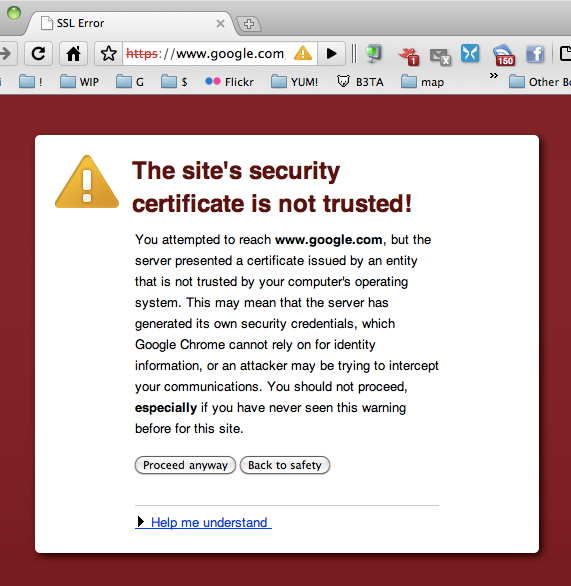
Now, this may turn out to be some sort of anomoly, but it makes a nice screen grab 🙂
Month: March 2010
the inefficiency filter
It’s like there’s some sort of inefficiency filter built into microsoft products! Here I am frittering away my afternoon with html display differences between Outlook 2004 and Outlook 2007. I can’t reproduce the problems so I ask my client to send a screengrab… it arrives: 9.7Mb! a screengrab!!
Just out of curiosity, I took a screengrab of the screengrab, to see what file size the mac produced… 700kb. That’s a bit more sensible! Both are lossless formats (tif vs. png), so what’s the story? Is this the default format for windoze screengrabs? Do they write rows of invisible data into the file format just to get it up to that ridiculous size… some sort of inflation algorithm!?
microsoft larfs
Having kicked off a mac vs. pc flame war on work’s IT mailing list this morning, I was delighted to see the following irony play out on screen. As the good folk debated the weight of downloads and updates, Microsoft AutoUpdate launched and proceeded to tell me I needed 150Mb. of sealing wax to plug a few holes. Half way through, I get this priceless message…

Thank you Microsoft 🙂
taking back the tubes
A short while ago, I posted about my frustration with imrworldwide.com, a site that seemed to be slowing my browsing experience.
After a little investigation, I realised that this was no more than a market research company’s “spyware”, javascripts that serve no purpose other than to track and report on my movements. They certainly don’t add to my browsing experience. So, I asked the question at work: “how do I block these things?”, I’d tried to find a neat firefox plugin, but they were all a bit feature rich for my needs. I just wanted a block. Then I was reminded by the folk at work of the hosts file – a wonderful little file that I could edit to effectively short-circuit the usual DNS lookup process. Not only that, but I was pointed to this site, which provided a huge ready made list of undesirable urls that you could just paste in and enjoy never seeing again! You need to know what you’re doing – otherwise you risk breaking your connection to the internet, but it’s not terribly difficult.
OK, so it might be a little bit ‘tinfoil hat’, but it seems to be working nicely and now when I visit large commercial sites, they load faster and they don’t snoop on my movements. Instead of nauseating banner ads about losing weight and dental work, I get nice empty space. Combined with the FlashBlocker plugin the effect is really quite excellent!